Capture the good parts of YouTube — and actually find them again.
For people who learn from long videos and podcasts: one tap saves the moment, AI titles it, and you search your library by meaning — not keywords. Describe what you half-remember, jump straight back to it.
Add to Chrome Free to start · Your library lives on your device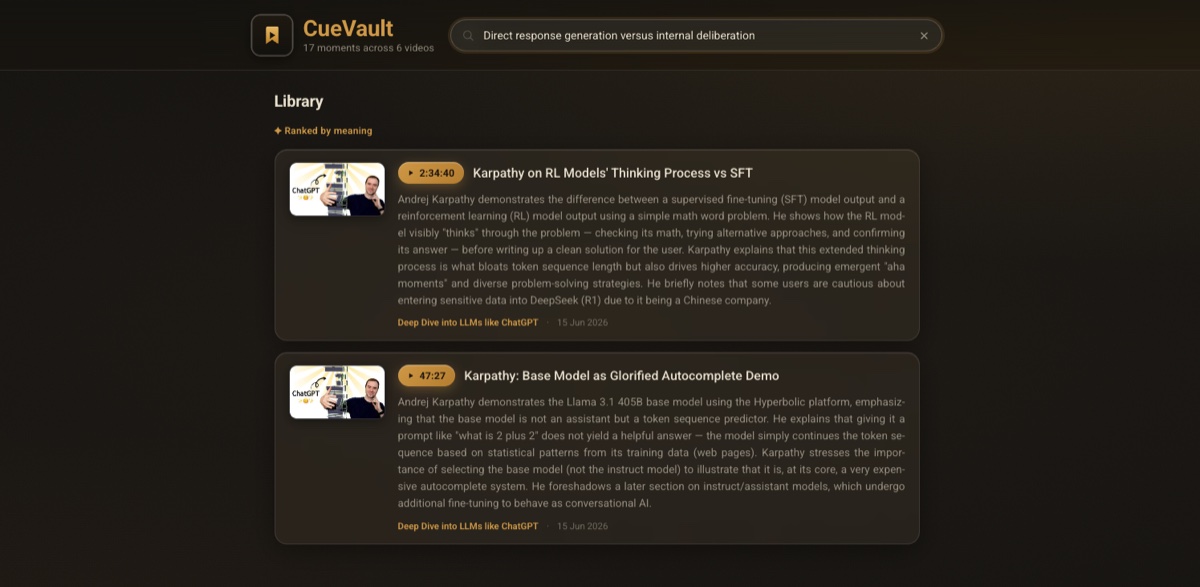
Made for anyone who learns on YouTube
If you've ever re-scrubbed a 2-hour video to find 40 seconds you swear you saw — this is for you.
Students & self-learners
Lectures, tutorials, courses — save the explanation that finally clicked, and find it the night before the exam.
Researchers & knowledge workers
Talks, interviews, conference recordings — keep the insight, stat, or quote with its source timestamp attached.
Investors & traders
A 2-hour market breakdown has one setup you need. Save it; later search “the bit about position sizing” and jump right back.
Podcast & creator bingers
That brilliant line in hour two of a 3-hour episode — captured in a tap. Never scrub to find it again.
One-tap capture
Hit the button (or Shift+B) and CueVault grabs the moment — no pausing, no copy-paste.
AI titles & summaries
Each moment gets a clear title and a short summary, so your library reads like notes — not a pile of timestamps.
Search by meaning
Don't remember the exact words? Describe what you half-remember and CueVault finds the right clip — then jumps you back to the second it happened.
How it works
Watch. When something's worth keeping, tap the CueVault button on the player.
Capture. CueVault saves the timestamp and the surrounding transcript and AI-titles it.
Recall. Open your library, search, and jump back to the exact moment anytime.
From the Chrome Web Store
The ability to retrieve information based on context rather than precise titles or tags feels natural and saves significant time… a powerful knowledge retrieval tool that turns a growing collection of saved content into an easily searchable personal library.
A simple, reliable extension that just works. I use it daily to capture quick notes and clips while researching — the UI is clean, saves instantly… CueVault is your superman here, coming to your rescue.
Free to start. Pro when you outgrow.
- Everything in Free
- Unlimited saved moments (fair use applies)
- Cloud sync — coming soon
Fair use = up to 300 new saves per month (resets monthly) — your saved library itself is always unlimited.
Your library, everywhere — soon.
Cross-device cloud sync is on the way. Drop your email and we'll tell you the day it ships.